// Create a layer for our child, and paint the child into it. // 给子节点创建一个layer,然后在上面绘制 if (child._needsPaint) { repaintCompositedChild(child, debugAlsoPaintedParent: true); } else { assert(() { // register the call for RepaintBoundary metrics child.debugRegisterRepaintBoundaryPaint(); child._layerHandle.layer!.debugCreator = child.debugCreator ?? child; returntrue; }()); } assert(child._layerHandle.layer is OffsetLayer); final OffsetLayer childOffsetLayer = child._layerHandle.layer! as OffsetLayer; childOffsetLayer.offset = offset; appendLayer(childOffsetLayer); }
void markNeedsPaint() { assert(!_debugDisposed); assert(owner == null || !owner!.debugDoingPaint); if (_needsPaint) return; _needsPaint = true; //如果RenderObject.isRepaintBoundary 为true,则该RenderObject拥有layer,直接绘制 if (isRepaintBoundary) { assert(() { if (debugPrintMarkNeedsPaintStacks) debugPrintStack(label: 'markNeedsPaint() called for $this'); returntrue; }()); // If we always have our own layer, then we can just repaint // ourselves without involving any other nodes. assert(_layerHandle.layer is OffsetLayer); if (owner != null) { //找到最近的layer,绘制 owner!._nodesNeedingPaint.add(this); owner!.requestVisualUpdate(); } } elseif (parent is RenderObject) { // 没有自己的layer, 会和一个祖先节点共用一个layer final RenderObject parent = this.parent! as RenderObject; parent.markNeedsPaint(); assert(parent == this.parent); } else { assert(() { if (debugPrintMarkNeedsPaintStacks) debugPrintStack(label: 'markNeedsPaint() called for $this (root of render tree)'); returntrue; }()); // If we're the root of the render tree (probably a RenderView), // then we have to paint ourselves, since nobody else can paint // us. We don't add ourselves to _nodesNeedingPaint in this // case, because the root is always told to paint regardless. if (owner != null) // 如果直到根节点也没找到一个Layer,那么便需要绘制自身,因为没有其它节点可以绘制根节点。 owner!.requestVisualUpdate(); } }
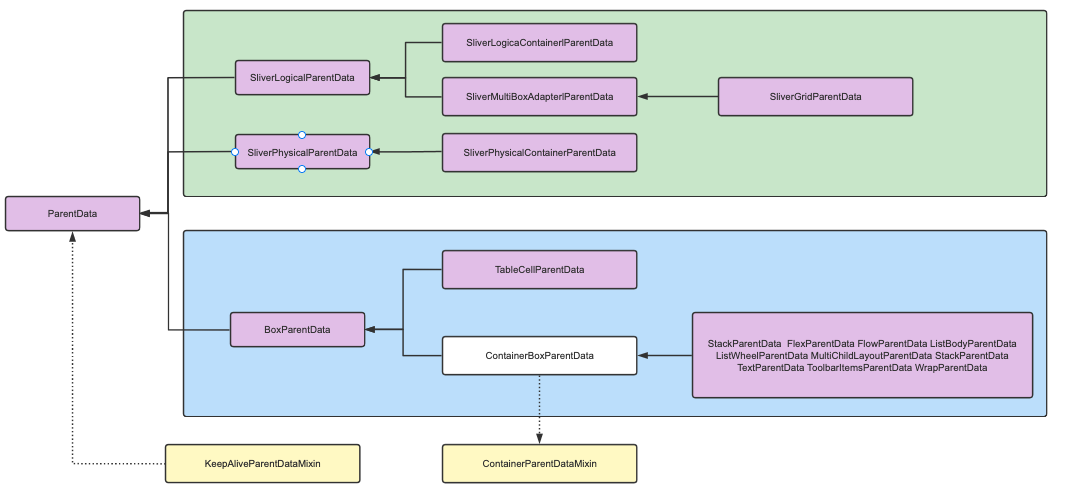
/// Parent data used by [RenderBox] and its subclasses. classBoxParentDataextendsParentData{ /// The offset at which to paint the child in the parent's coordinate system. Offset offset = Offset.zero;