State

概述

State表示对应的StatefulElement需要保存的信息。

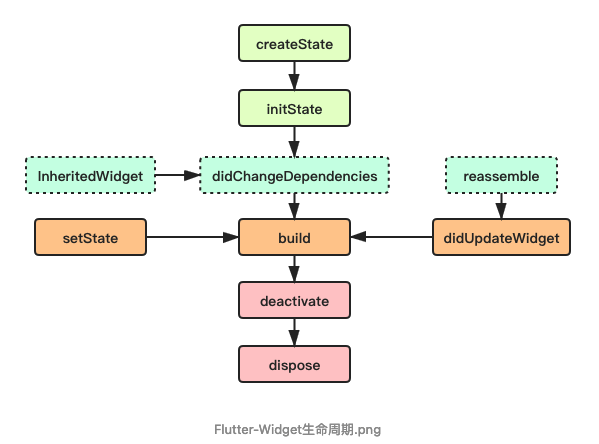
生命周期
常用属性

widget

它表示与该State实例关联的widget实例,由Flutter framework动态设置。注意,这种关联并非永久的,因为在应用生命周期中,UI树上的某一个节点的widget实例在重新构建时可能会变化,但State实例只会在第一次插入到树中时被创建,当在重新构建时,如果widget被修改了,Flutter framework会动态设置State.widget为新的widget实例。

context

StatefulWidget对应的BuildContext,作用同StatelessWidget的BuildContext,表示当前widget在widget树中的上下文,每一个widget都会对应一个context对象(因为每一个widget都是widget树上的一个节点)。

常用方法

initState

当Widget第一次插入到Widget树时会被调用,对于每一个State对象,Flutter framework只会调用一次该回调,所以,通常在该回调中做一些一次性的操作,
如状态初始化、订阅子树的事件通知等。不能在该回调中调用BuildContext.dependOnInheritedWidgetOfExactType
(该方法用于在Widget树上获取离当前widget最近的一个父级InheritFromWidget,关于InheritedWidget我们将在后面章节介绍),原因是在初始化完成后,
Widget树中的InheritFromWidget也可能会发生变化,所以正确的做法应该在build()方法或didChangeDependencies()中调用它。
Read More

AppBar

概述

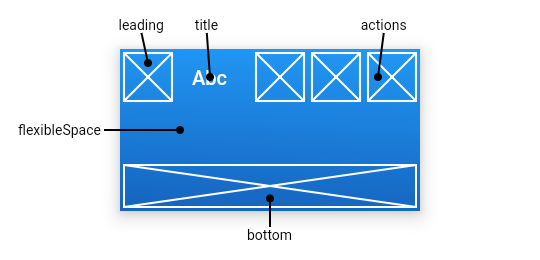
AppBar(应用栏)由一个工具栏和其他小部件组成,应用栏通常使用IconButton公开一个或多个操作,使用PopMenuButton作为点击后展开的菜单。

AppBar通常用于Scaffold.appBar属性,它将应用栏固定高度的小部件放置在屏幕顶部。对于可滚动的应用栏,则使用SliverAppBar,它将AppBar嵌入到sliver中。

常用属性

Read More

文本处理

TextPainter

1
2
3
4
5
6
7
8
9
10
11
12
13
14
15
16
17
18
19

class MyPainter extends CustomPainter {
@override
void paint(Canvas canvas, Size size) {
/// 绘制文本
const textStyle = TextStyle(color: Colors.black, fontSize: 24);
const textSpan = TextSpan(text: 'Hello, World', style: textStyle);
final textPainter = TextPainter(text: textSpan, textDirection: TextDirection.ltr);
textPainter.layout(minWidth: 0, maxWidth: size.width);
const offset = Offset(50, 100);
textPainter.paint(canvas, offset);
}

@override
bool shouldRepaint(covariant CustomPainter oldDelegate) {
return false;
}
}

TextPainter封装了Paragraph,用于绘制文本。

1
2
3
4
5
6
7
8
9
10
11
12
13
14
15
16
17
18
19
20
21
22
23
24
25
26
27
28
29
30
31
32
33
34
35
36
37
38
39
40
41
42
43
44
45
46
47
48
49
50
51
52
53
54
55
56
57
58
59
60
61
62
63
64
65
66
67
68
69
70
71
72
73
74
75
76
77
78
79
80
81
82
83
84
class TextPainter {
TextPainter({
InlineSpan? text,//文本内容
TextAlign textAlign = TextAlign.start,//对齐方式
TextDirection? textDirection,
double textScaleFactor = 1.0,
int? maxLines,
String? ellipsis,
Locale? locale,
StrutStyle? strutStyle,
TextWidthBasis textWidthBasis = TextWidthBasis.parent,
ui.TextHeightBehavior? textHeightBehavior,
})


void layout({ double minWidth = 0.0, double maxWidth = double.infinity }) {
if (_paragraph != null && minWidth == _lastMinWidth && maxWidth == _lastMaxWidth) {
return;
}

if (_rebuildParagraphForPaint || _paragraph == null) {
_createParagraph();
}
_lastMinWidth = minWidth;
_lastMaxWidth = maxWidth;
// A change in layout invalidates the cached caret and line metrics as well.
_lineMetricsCache = null;
_previousCaretPosition = null;
_layoutParagraph(minWidth, maxWidth);
_inlinePlaceholderBoxes = _paragraph!.getBoxesForPlaceholders();
}

void _layoutParagraph(double minWidth, double maxWidth) {
_paragraph!.layout(ui.ParagraphConstraints(width: maxWidth));//布局
if (minWidth != maxWidth) {
double newWidth;
switch (textWidthBasis) {
case TextWidthBasis.longestLine:
newWidth = _applyFloatingPointHack(_paragraph!.longestLine);
case TextWidthBasis.parent:
newWidth = maxIntrinsicWidth;
}
newWidth = clampDouble(newWidth, minWidth, maxWidth);
if (newWidth != _applyFloatingPointHack(_paragraph!.width)) {
_paragraph!.layout(ui.ParagraphConstraints(width: newWidth));
}
}
}

void paint(Canvas canvas, Offset offset) {
final double? minWidth = _lastMinWidth;
final double? maxWidth = _lastMaxWidth;
if (_paragraph == null || minWidth == null || maxWidth == null) {
throw StateError(
'TextPainter.paint called when text geometry was not yet calculated.\n'
'Please call layout() before paint() to position the text before painting it.',
);
}

if (_rebuildParagraphForPaint) {
_createParagraph();
_layoutParagraph(minWidth, maxWidth);
}
canvas.drawParagraph(_paragraph!, offset);//绘制
}

ui.Paragraph? _paragraph; //封装的Paragraph

ui.Paragraph _createParagraph() {
final InlineSpan? text = this.text;
if (text == null) {
throw StateError('TextPainter.text must be set to a non-null value before using the TextPainter.');
}
final ui.ParagraphBuilder builder = ui.ParagraphBuilder(_createParagraphStyle());
text.build(builder, textScaleFactor: textScaleFactor, dimensions: _placeholderDimensions);
_inlinePlaceholderScales = builder.placeholderScales;
final ui.Paragraph paragraph = _paragraph = builder.build();
_rebuildParagraphForPaint = false;
return paragraph;
}


}

Read More

CustomMultiChildLayout

CustomMultiChildLayout从字面意思就说的很清楚了,自定义多个孩子的布局控件

基本用法

1
2
3
4
5
6
7
8
9
10
11
12
13
14
15
16
17
18
19
20
21
22
23
24
25
26
27
28
29
30
31
32
33
34
35
36
37
38

CustomMultiChildLayout(
delegate: XXXDelegate(dataList), //委托 用于设置child的大小和位置
children: dataList.map((e) => LayoutId(id: e['id'], child: const _FigureBlock())).toList(), //视图 对应每个child显示的样子
)

class _FigureBlock extends StatelessWidget {

}


class XXXDelegate extends MultiChildLayoutDelegate {

XXXDelegate(this.dataList);
List dataList;
/// 处理大小和位置
@override
void performLayout(Size size) {
for (var element in dataList) {
String id = element['id'];
Rect rect = element['rect'];

// 约束对应id的child的消息
layoutChild(id, BoxConstraints(maxHeight: rect.height, maxWidth: size.width));
// 对应id的child的位置
positionChild(id, Offset(rect.left, rect.top));
}
}

/// 是否需要重新布局
@override
bool shouldRelayout(_BlockEventMultiChildLayoutDelegate oldDelegate) {
return oldDelegate.dataList != dataList;
}

}