目录 自定义View 自定义View之Canvas 自定义View之Paint
API 颜色设置 1 2 3 4 5 6 7 8 9 10 11 12 setColor(int color) paint.setColor(Color.parseColor("#009688" )); canvas.drawRect(30 , 30 , 230 , 180 , paint); setARGB(int a, int r, int g, int b) paint.setARGB(100 , 255 , 0 , 0 ); canvas.drawRect(0 , 0 , 200 , 200 , paint);
Shader设置 在 Android 的绘制里使用 Shader ,并不直接用 Shader 这个类,而是用它的几个子类。具体来讲有:
LinearGradient:线性渐变 RadialGradient:辐射渐变 SweepGradient:扫描渐变 BitmapShader ComposeShader:混合着色器 在设置了 Shader 的情况下, Paint.setColor/ARGB() 所设置的颜色就不再起作用。
1 2 3 4 5 6 7 8 9 10 11 12 13 14 15 16 17 18 19 20 21 22 23 24 25 26 27 28 29 Shader shader = new LinearGradient (100 , 100 , 500 , 500 , Color.parseColor("#E91E63" ), Color.parseColor("#2196F3" ), Shader.TileMode.CLAMP); paint.setShader(shader); ... canvas.drawCircle(300 , 300 , 200 , paint); Bitmap bitmap = BitmapFactory.decodeResource(getResources(), R.drawable.batman);Shader shader = new BitmapShader (bitmap, Shader.TileMode.CLAMP, Shader.TileMode.CLAMP);paint.setShader(shader); ... canvas.drawCircle(300 , 300 , 200 , paint); Bitmap bitmap1 = BitmapFactory.decodeResource(getResources(), R.drawable.batman);Shader shader1 = new BitmapShader (bitmap1, Shader.TileMode.CLAMP, Shader.TileMode.CLAMP);Bitmap bitmap2 = BitmapFactory.decodeResource(getResources(), R.drawable.batman_logo);Shader shader2 = new BitmapShader (bitmap2, Shader.TileMode.CLAMP, Shader.TileMode.CLAMP);Shader shader = new ComposeShader (shader1, shader2, PorterDuff.Mode.SRC_OVER);paint.setShader(shader); ... canvas.drawCircle(300 , 300 , 300 , paint);
PorterDuff.Mode 是用来指定两个图像共同绘制时的颜色策略的。它是一个 enum,不同的 Mode 可以指定不同的策略。参考:
https://developer.android.com/reference/android/graphics/PorterDuff.Mode.html
颜色滤镜 ColorFilterLightingColorFilter PorterDuffColorFilter ColorMatrixColorFilter 1 2 3 4 5 6 7 8 setColorFilter(ColorFilter colorFilter) ColorFilter lightingColorFilter = new LightingColorFilter (0x00ffff , 0x000000 );paint.setColorFilter(lightingColorFilter);
setXfermode 设置抗锯齿 抗锯齿默认是关闭的,如果需要抗锯齿,需要显式地打开。另外,除了 setAntiAlias(aa) 方法,打开抗锯齿还有一个更方便的方式:构造方法。
1 2 3 4 5 setAntiAlias (boolean aa) Paint paint = new Paint (Paint.ANTI_ALIAS_FLAG);
setStyle 1 2 3 4 5 6 7 paint.setStyle(Paint.Style.FILL); canvas.drawCircle(300 , 300 , 200 , paint); paint.setStyle(Paint.Style.STROKE); canvas.drawCircle(300 , 300 , 200 , paint);
线条形状 setStrokeWidth(float width) setStrokeCap(Paint.Cap cap) setStrokeJoin(Paint.Join join) setStrokeMiter(float miter) 1 2 3 4 5 6 7 paint.setStyle(Paint.Style.STROKE); paint.setStrokeWidth(1 ); canvas.drawCircle(150 , 125 , 100 , paint); paint.setStrokeWidth(5 ); canvas.drawCircle(400 , 125 , 100 , paint); paint.setStrokeWidth(40 ); canvas.drawCircle(650 , 125 , 100 , paint);
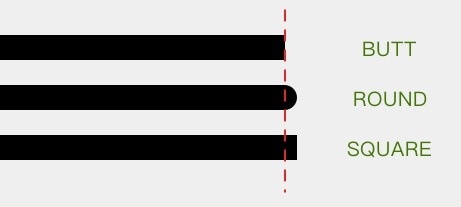
setStrokeCap 线头形状有三种:
BUTT 平头(默认) ROUND 圆头 SQUARE 方头。
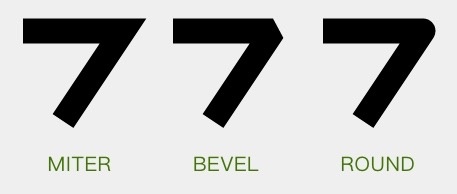
setStrokeJoin MITER 尖角 BEVEL 平角 ROUND 圆角。
setStrokeMiter 这个方法是对于 setStrokeJoin() 的一个补充,它用于设置 MITER 型拐角的延长线的最大值。
色彩优化 1 2 3 4 5 6 7 8 9 setDither(boolean dither) setFilterBitmap(boolean filter)
setPathEffect 使用 PathEffect 来给图形的轮廓设置效果。对 Canvas 所有的图形绘制有效,也就是 drawLine() drawCircle() drawPath() 这些方法。
CornerPathEffect 把所有拐角变成圆角
1 2 3 4 PathEffect pathEffect = new CornerPathEffect (20 );paint.setPathEffect(pathEffect); ... canvas.drawPath(path, paint);
DiscretePathEffect 把线条进行随机的偏离,让轮廓变得乱七八糟。乱七八糟的方式和程度由参数决定。
1 2 3 4 5 PathEffect pathEffect = new DiscretePathEffect (20 , 5 );paint.setPathEffect(pathEffect); ... canvas.drawPath(path, paint);
绘制虚线 1 2 3 4 5 6 7 8 9 10 11 12 13 14 15 PathEffect pathEffect = new DashPathEffect (new float []{20 , 10 , 5 , 10 }, 0 );paint.setPathEffect(pathEffect); ... canvas.drawPath(path, paint); Path dashPath = ...; PathEffect pathEffect = new PathDashPathEffect (dashPath, 40 , 0 , PathDashPathEffectStyle.TRANSLATE); paint.setPathEffect(pathEffect); ... canvas.drawPath(path, paint);
SumPathEffect 1 2 3 4 5 6 PathEffect dashEffect = new DashPathEffect (new float []{20 , 10 }, 0 );PathEffect discreteEffect = new DiscretePathEffect (20 , 5 ); pathEffect = new SumPathEffect (dashEffect, discreteEffect); ... canvas.drawPath(path, paint);
ComposePathEffect setShadowLayer 在之后的绘制内容下面加一层阴影
1 2 3 paint.setShadowLayer(10 , 0 , 0 , Color.RED); ... canvas.drawText(text, 80 , 300 , paint);
setMaskFilter 为之后的绘制设置 MaskFilter。上一个方法 setShadowLayer() 是设置的在绘制层下方的附加效果;而这个 MaskFilter 和它相反,设置的是在绘制层上方的附加效果。
MaskFilter 有两种: BlurMaskFilter 和 EmbossMaskFilter
1 2 3 paint.setMaskFilter(new BlurMaskFilter (50 , BlurMaskFilter.Blur.NORMAL)); ... canvas.drawBitmap(bitmap, 100 , 100 , paint);
文字相关 setTextSize 设置字体大小
setTypeface 设置字体
setFakeBoldText 是否使用伪粗体
setStrikeThruText 是否加删除线
setUnderlineText 是否加下划线
setTextSkewX 设置文字横向错切角度
setTextScaleX 设置文字横向放缩
setLetterSpacing 设置字符间距
setFontFeatureSettings 用 CSS 的 font-feature-settings 的方式来设置文字
1 2 3 4 paint.setFontFeatureSettings("smcp" ); canvas.drawText("Hello HenCoder" , 100 , 150 , paint);
setTextAlign 设置文字的对齐方式。一共有三个值:LEFT CETNER 和 RIGHT。默认值为 LEFT。
setTextLocale 设置绘制所使用的 Locale
setHinting 设置是否启用字体的 hinting (字体微调)
getFontSpacing 获取推荐的行距
getTextBounds 获取文字的显示范围
measureText 测量文字的宽度并返回
getTextWidths getTextWidths(String text, float[] widths)
获取字符串中每个字符的宽度,并把结果填入参数 widths
breakText 也是用来测量文字宽度的。但和 measureText() 的区别是, breakText() 是在给出宽度上限的前提下测量文字的宽度。如果文字的宽度超出了上限,那么在临近超限的位置截断文字。
光标相关 getRunAdvance 1 2 3 4 getRunAdvance(CharSequence text, int start, int end, int contextStart, int contextEnd, boolean isRtl, int offset)
getOffsetForAdvance 给出一个位置的像素值,计算出文字中最接近这个位置的字符偏移量(即第几个字符最接近这个坐标)。
1 2 3 4 5 6 7 8 9 getOffsetForAdvance(CharSequence text, int start, int end, int contextStart, int contextEnd, boolean isRtl, float advance)
参考